
Understanding ChatGPT’s ?hints Parameter - A UI Shortcut, Not a Search Window

1. Hype vs. Reality in AI Research
Over the past few weeks, screenshots and videos showing ChatGPT URLs ending in ?hints=search&q=[query] have spread widely across social platforms. Many users claimed this parameter could “force ChatGPT to search” or even “reveal its Bing queries”.
That excitement was understandable — the prospect of peering behind ChatGPT’s interface is tempting for researchers and curious users alike. However, this assumption misses a critical distinction.
The ?hints parameter is a frontend user interface hint, not a backend trigger. It doesn’t expose ChatGPT’s search pipeline, retrieval queries, or data sources.
This article aims to separate fact from fiction: explaining what ?hints really does, how it can still be used responsibly, and where its limits firmly lie.
2. What the ?hints Parameter Actually Does
When appended to a ChatGPT URL, the parameter instructs the client interface (the webpage you see) to pre-fill a prompt or select a mode. Examples include:
?hints=search&q=[query]— Prefills a query and, if your account supports Browse with Bing, may automatically enable the web-enabled mode.?hints=reason— Suggests that the model take a more reflective or step-by-step reasoning approach, though this is inconsistent and largely cosmetic.
However, the key technical reality is that these hints operate only at the UI layer.
They do not:
- Reveal the exact search queries ChatGPT sends to Bing.
- Guarantee that a search will occur — the model may still rely entirely on internal knowledge.
- Provide any access to ranking algorithms, retrieval logs, or the model’s backend logic.
In short, ?hints is a client-side shortcut, not a diagnostic interface or developer API.
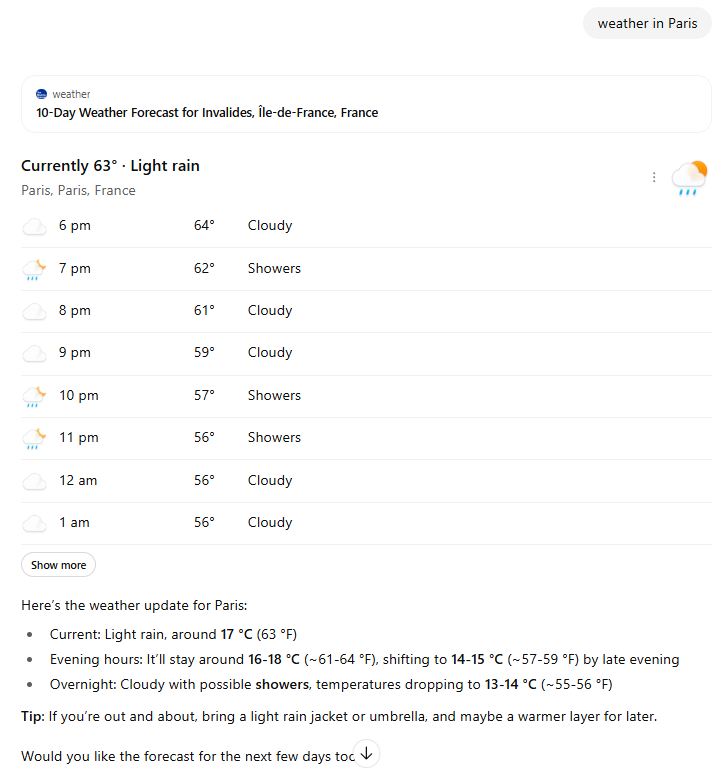
The following query example: https://chatgpt.com/?hints=search&q=weather+in+Paris results in this screenshot.
3. Practical (But Limited) Use Cases
Although its capabilities are narrow, the parameter can still be useful in a few contexts — especially for demonstrations, testing, and consistency checks.
3.1 Rapid Initiation of Web-Enabled Chats
If you frequently test or demonstrate ChatGPT’s browsing features, ?hints=search&q=[query] saves time. It launches a chat with your question pre-filled and the browsing tool primed — useful for testing live-data questions such as “current exchange rate GBP to EUR” or “latest Linux kernel version”.
3.2 Basic Behavioural Observation
Researchers can use it to observe how ChatGPT presents information when browsing is available. Does the model cite sources? Does it summarise from live pages or rely on internal training data?
These small indicators reveal behavioural patterns, not internal mechanics. You see the end result, not the search path.
3.3 Prompt Consistency Testing
By standardising query input across sessions, ?hints helps minimise human error. This is useful for A/B testing response formats — for instance, comparing how GPT-4 and o1 phrase the same search query when both start from identical conditions.
For best results, combine this with session hygiene: open an incognito window, clear cache and cookies, and start a fresh conversation each time.
3.4 Educational Demonstrations
Teachers and trainers can use it to show learners how ChatGPT integrates live web results, highlighting the distinction between knowledge recall (“I know this”) and retrieval (“I looked this up”).
It’s an excellent visual aid for explaining the difference between model training and web access.
4. Operational Best Practices (Given the Limits)
Because ?hints sits within the user interface, good testing discipline is essential if you want reliable observations:
- Use incognito mode or private browsing to avoid session carry-over.
- Clear cookies and cache before each test.
- Start new chats to prevent conversation history from influencing results.
- Respect soft limits — performance may degrade after 100–200 rapid interactions; pausing or switching browsers can help.
- Don’t rely on citations — even in browsing mode, ChatGPT may omit source links for factual statements it deems common knowledge.
These steps won’t unlock hidden data, but they’ll improve consistency across trials.
5. What You Cannot Do (Managing Expectations)
Despite the temptation, the ?hints parameter cannot be used to extract proprietary data or replicate internal processes.
- ❌ No internal search visibility — you can’t see the exact Bing query strings ChatGPT sends.
- ❌ No insight into ranking or selection — why one source appears over another remains opaque.
- ❌ No guaranteed browsing activation — for well-known facts, the system may skip web access.
- ❌ No scalable research method — there’s no API endpoint, batching, or automation support.
These limitations make ?hints unsuitable for quantitative research, data scraping, or reverse engineering. It’s designed for individual exploration, not bulk analysis.
6. Ethical and Compliance Notes
Even harmless curiosity should operate within ethical boundaries. Manual use of ?hints remains subject to OpenAI’s Terms of Use, which prohibit attempts to extract confidential system information.
When discussing or publishing results, clarity matters:
Always disclose that ?hints reflects user-interface behaviour only. It does not provide internal data access, system introspection, or privileged insight into model design.
Framing this correctly avoids spreading misinformation and ensures your research remains credible.
7. A Responsible Research Mindset
Think of ?hints=search as a convenience function — a way to start specific kinds of chats more efficiently, not a scientific probe into the model’s engine.
Those who wish to study ChatGPT’s retrieval behaviour should complement it with other controlled methods:
- Compare prompts with and without browsing enabled.
- Test across multiple models (GPT-4, o1, etc.) for structural differences.
- Track official documentation for changes to browsing and retrieval capabilities.
Staying sceptical and methodical helps separate genuine insight from noise generated by speculation.
8. Curiosity, Not Control
The ?hints parameter is a reminder of how user interfaces shape our understanding of AI systems. It’s intriguing, yes — but it doesn’t open a window into ChatGPT’s mind.
At best, it’s a shortcut for launching browsing sessions or teaching demonstrations. At worst, it’s a source of overhyped claims that obscure the real work of responsible AI research.
Ultimately, ChatGPT’s public interface is a curated experience, not a transparent laboratory. True understanding of how AI models search, rank, and retrieve information will come from official research disclosures and technical papers, not URL tricks.
Until then, keep experimenting — thoughtfully, transparently, and with realistic expectations.