
How to Easily Redirect Your pages.dev Domain to a Custom Domain Using Cloudflare

2 min read
Cloudflare's Bulk Redirects feature allows you to manage multiple redirects efficiently. This guide will walk you through the process of setting up a bulk redirect from a *.pages.dev domain to a custom domain.
Step 1: Access the Cloudflare Dashboard
- Log in to your Cloudflare account.
- Navigate to the dashboard of your account.
Note: If you have access to multiple accounts, then you may need to repeat this for any project listed under the different accounts.
Step 2: Create a Bulk Redirect List
- In the Cloudflare dashboard menu, find and click on Bulk Redirects.
- Click the Create Bulk Redirect List button.
- Give your list a name example: pages_dev_redirect
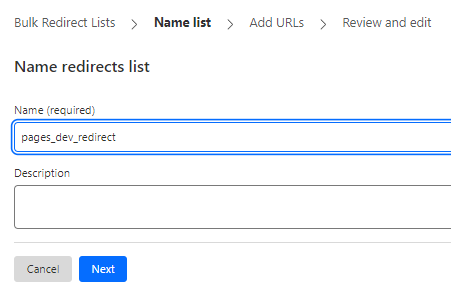
- Click next and then select manually add URL redirects
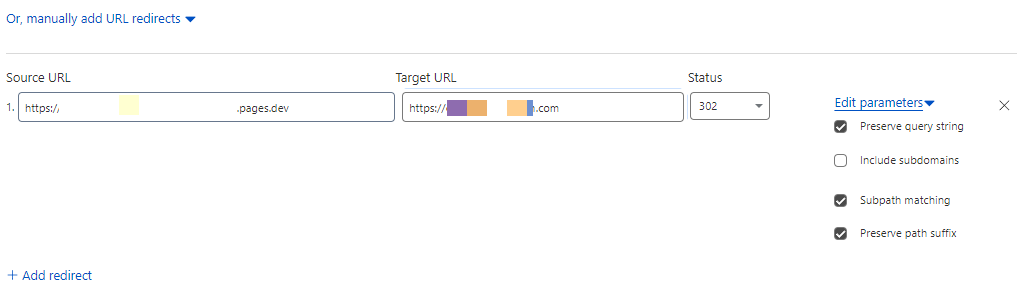
- In the list, enter the following details:
- Source URL: yoursite.pages.dev/
- Target URL: https://www.yoursite.com
- Status: Start with a 302 temporary redirect to test the setup.
- Ensure that the options to Preserve query string, Subpath matching, and Preserve path suffix are checked.
Step 3: Activate the Bulk Redirect List
- After entering the redirect details, check the list status. It may take a moment to activate.
- Once active, move to creating a rule to implement these redirects.
Step 4: Create a Bulk Redirect Rule
- Go to Bulk Redirects > Bulk Redirect Rules in the dashboard.
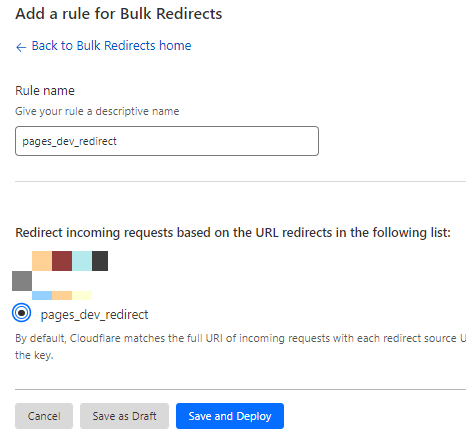
- Click the Create Bulk Redirect Rule button.
- Name your rule (e.g., "pages_dev_redirect").
- Select the redirect list you created in Step 2 from the dropdown menu.
- Click Save.
Step 5: Enable and Test Your Redirect
- Ensure the Bulk Redirect Rule is enabled (look for the green tick).
- Test the redirect by visiting your
*.pages.devURL in a web browser. It should redirect to your custom domain. - If successful, consider changing the redirect status from
302to301for a permanent redirect.
Further notes...
Successfully redirecting your *.pages.dev domain to a custom domain using Cloudflare's Bulk Redirects streamlines your web traffic and enhances brand consistency. This guide simplifies setting up redirects, ensuring a seamless visitor experience and maintaining your site’s professionalism.