
A Step-by-Step Guide to Automated Email Clean-up in FreeScout
What is FreeScout?
FreeScout is a powerful open-source help desk and shared inbox software designed to simplify customer support communication. With its user-friendly interface and advanced features, FreeScout is a go-to solution for managing emails efficiently.
This guide assumes you have a good understanding of Freescout Admin Area.
Why Email Clean-up is Important
Maintaining a clutter-free inbox is essential for productive communication. Automated email clean-up not only keeps your inbox organized but also enhances your email management workflow.
Workflow Rules
1. Change Status to Pending after X Days
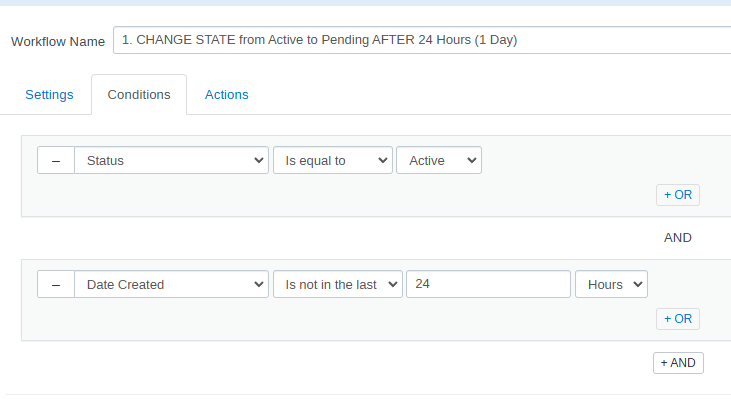
- Create new Workflow
- Settings: Automatic, apply to previous conversations (if required)
- Conditions: Status = Active & is not in last 24 hours
- Action: Change Status to Pending
2. Move Pending After X Days to Deleted Folder
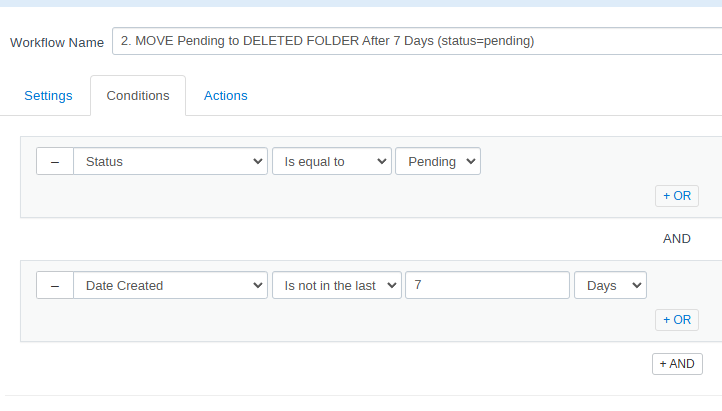
- Create new Workflow
- Settings: Automatic, apply to previous conversations (if required)
- Conditions: Status = Pending & is not in last 7 Days
- Action: Move to Deleted Folder
3. Permanently Delete After X Days
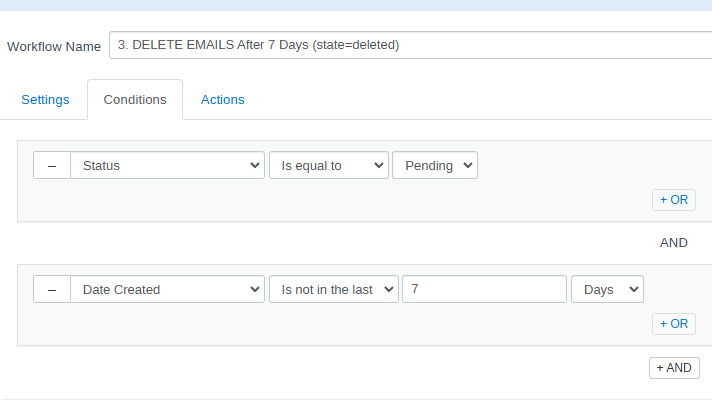
- Create new Workflow
- Settings: Automatic, apply to previous conversations (if required)
- Conditions: Status = Pending & is not in last 7 Days
- Action: Delete Forever
Note
Setting the Workflow to delete conversations which are marked as Closed and in the Deleted folder does not work.
Benefits of Email Clean-up Automation
- Decluttered Inbox: Maintain a tidy inbox for better focus.
- Enhanced Efficiency: Spend less time searching for important emails.
- Data Privacy: Ensure sensitive information is properly managed and deleted.
Further notes...
Automated email clean-up in FreeScout offers a hassle-free way to keep your inbox organized and efficient. By implementing these simple steps, you'll enjoy a streamlined email management experience, allowing you to focus on what truly matters: effective communication with your customers.
Give these setup procedures a try and experience the benefits of an organized inbox with FreeScout's automation capabilities.