
Creating Short Links for Easy Admin Access with Cloudflare

Cloudflare dynamic redirects offer a practical solution for configuring URL redirects based on specific criteria. This guide will explain how to set up a short link for swift access to your admin area, enhancing both security and convenience.
Creating a Short Link for Admin Access
To establish a short link for your admin area, employ the `concat` function in Cloudflare’s dynamic redirects to amalgamate the protocol, host, and path. For example:
concat("https://", http.host, "/administrator/index.php?YOURUNIQUEKEY&cf=12345")Here, https:// represents the protocol, http.host reflects the hostname of the current request, /administrator/index.php directs to the admin area, YOURUNIQUEKEY is a placeholder for your unique admin key, and cf=12345 is a parameter to indicate that the request originated from Cloudflare.
Configuring the Redirect Rule
Follow these steps to implement your redirect rule:
- Sign into your Cloudflare account.
- Choose the domain you wish to configure.
- Navigate to the Rules section.
- Select Redirect Rules
- Click on Create Rule.
- Choose Custom Filter expression.
- Input the URL pattern for your admin area.
- Under URL redirect choose Dynamic.
- Add the expression you require based on the example above.
- Choose 302 - Not Permanent Redirect for the type of redirect.
- Click Deploy.
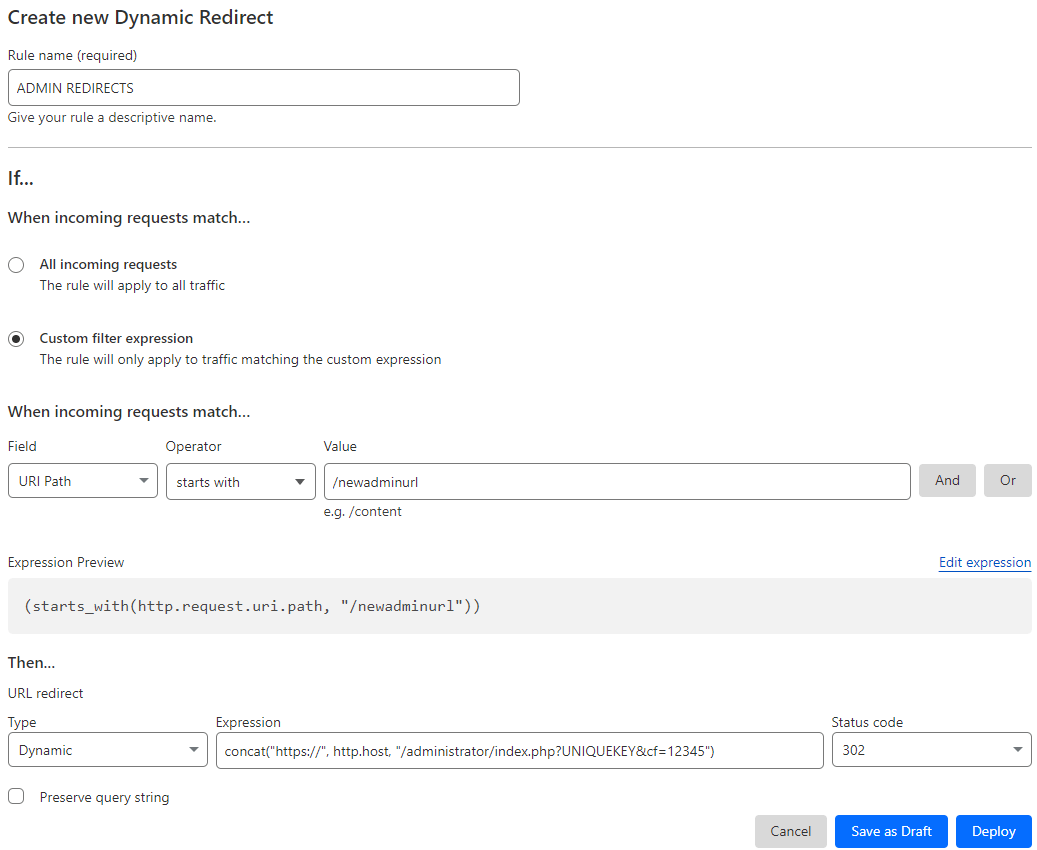
To verify the redirect rule, type the short link into your browser. Successful redirection to the admin area confirms correct setup.
Further notes...
Cloudflare dynamic redirects not only simplify the process of accessing your admin area but also enhance security and operational efficiency. By implementing the steps detailed above, you can quickly establish a direct and secure pathway to your admin area while effectively monitoring referral traffic. Try this approach to see how it can streamline your administrative tasks.
This configuration applies to the current version of Cloudflare as of 2024.04.22.