
Boost Your Twitter Engagement: Fixing X.com (Twitter) Card Image Problems in Cloudflare

X.com (Twitter) Cards are a powerful tool for enhancing your tweets by attaching rich media, such as images, to your links. However, if you're using Cloudflare as your web application firewall (WAF), you might encounter issues with X.com (Twitter) Card images not showing up due to certain WAF settings blocking access to the X.com (Twitter) user agent.
In this article, we will walk you through the process of solving this problem by creating a new WAF rule and configuring Cloudflare to allow access to the Twitterbot user agent.
Example X.com (Twitter) Card Markup
Before we dive into the solution, let's take a quick look at an example of X.com (Twitter) Card markup that you can use on your website to enable rich media previews when your content is shared on X.com (Twitter):
<meta name="twitter:card" content="summary_large_image">
<meta name="twitter:site" content="@YourTwitterHandle">
<meta name="twitter:title" content="Your Page Title">
<meta name="twitter:description" content="Your Page Description">
<meta name="twitter:image" content="https://www.example.com/image.jpg">
Creating a New WAF Rule on Cloudflare
To ensure that X.com (Twitter) Card images are not blocked by Cloudflare's WAF, follow these steps to create a new rule:
- Log in to your Cloudflare account.
- Go to the "Security" section and select the "WAF".
- Click on "Create WAF Rule" to create a new rule.
- Set the user agent to allow
Twitterbot/1.0. This ensures that the Twitterbot user agent can access your X.com (Twitter) Card images.
- Bypass the following settings to prevent them from interfering with the Twitterbot's access: All remaining custom rules, All rate limiting rules, All managed rules, All Super Bot Fight Mode Rules, User Agent Blocking, Browser Integrity Check, Hotlink Protection, Security Level.
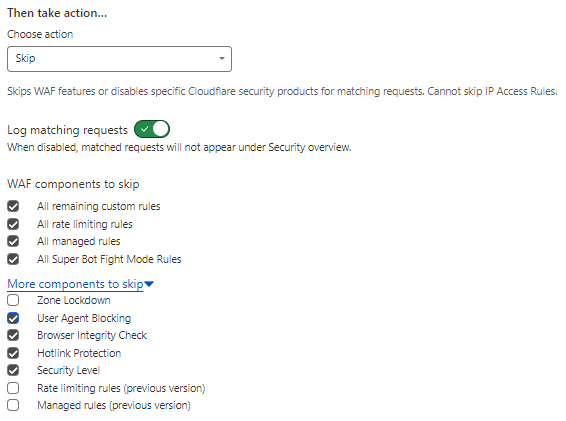
- Save the new WAF rule.
Ensuring Cloudflare WAF Rule Works for X.com (Twitter) Cards
Once you have created the new WAF rule, it's important to test and confirm that it's working correctly for X.com (Twitter) Cards. Follow these steps:
- Open your website and access a page that contains X.com (Twitter) Card markup.
- Use the X.com (Twitter) Card Validator tool (available at cards-dev.twitter.com/validator) to check if the X.com (Twitter) Card image is now visible, or login to your X.com (Twitter) account and test a post.
- If the image is successfully displayed, congratulations! You have resolved the X.com (Twitter) Card image issue in Cloudflare.
Note: If you are testing an older link, the image or content may still be cached, so always try a new article.
Important
Using image CDNs on X.com (formerly Twitter) can sometimes cause issues because Twitter’s crawler may face restrictions when accessing images served through third-party CDN services. CDNs often implement security measures, rate limiting, or have their own robots.txt rules that inadvertently block or restrict access to crawlers like Twitterbot. Additionally, proxy URLs or complex CDN configurations can prevent the crawler from retrieving the necessary image metadata, leading to problems in displaying images correctly in tweets.
To ensure seamless integration and proper image rendering, it's often more reliable to use direct image URLs hosted on your own server where access permissions are clearly defined and controlled.
Further notes...
By creating a new WAF rule and configuring Cloudflare to allow access to the Twitterbot user agent, you can overcome the issue of X.com (Twitter) Card images not showing up in Cloudflare. This ensures that your X.com (Twitter) Card previews appear as intended when your content is shared on X.com (Twitter). Remember to periodically review and update your WAF rules to maintain optimal performance and security.
5 Reasons to Use X.com (Twitter) Cards
- Enhanced Visual Appeal: X.com (Twitter) Cards allow you to include eye-catching images and media previews with your tweets, increasing engagement and attracting more attention from users.
- Increased Click-through Rates: By providing a rich preview of your content, X.com (Twitter) Cards entice users to click on your links, leading to higher click-through rates and increased traffic to your website.
- Brand Consistency: With X.com (Twitter) Cards, you can control the appearance of your shared content by specifying the title, description, and image, ensuring that your brand is presented consistently across X.com (Twitter).
- Better User Experience: X.com (Twitter) Cards provide a more informative and visually appealing experience for users, allowing them to get a glimpse of your content before clicking on the link.
- Analytics and Insights: X.com (Twitter) Cards provide valuable analytics and insights into how your content is performing on X.com (Twitter), allowing you to measure engagement, impressions, and click-through rates for your shared links.
By following the steps outlined in this article and leveraging the power of X.com (Twitter) Cards, you can enhance your social media presence and drive more traffic to your website.