
AWS Static Website Setup: Getting the Document Root Right for Seamless Performance
Setting up a static website on Amazon Web Services (AWS) seems straightforward, but some intricacies might catch you by surprise. One such aspect is the configuration of the default index document. While many assume it can be easily managed in the S3 bucket settings, AWS has a unique approach. In this blog post, we'll delve into the reason behind this behavior and explore how to effectively configure the default index document for your AWS static website using CloudFront settings.
Why Can't You Set the Default Index Document in S3 Bucket Settings?
When you create an S3 bucket to host a static website, you might expect to find a simple option in the bucket settings to specify the default index document, such as "index.html" or "home.html." However, surprisingly, the option to configure the default index document is there, but does not have an effect.
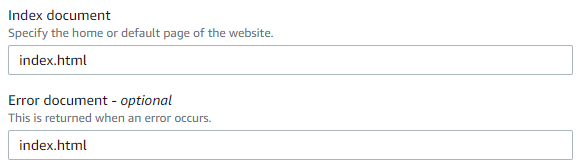
The reason behind this is rooted in the architecture of AWS's static website hosting. When you enable static website hosting for an S3 bucket, AWS automatically generates a unique endpoint (URL) for your website. This endpoint is accessible to the public, allowing visitors to access your website's content directly. However, S3 is a storage service rather than a content delivery network (CDN). Hence, it lacks certain advanced functionalities, including custom error handling and default index document configuration.
The Role of CloudFront in Index Document Configuration
To address these limitations and enhance website performance, AWS offers an ideal solution: Amazon CloudFront. CloudFront is a content delivery service that acts as a CDN, enabling efficient content distribution to users worldwide. It acts as a mediator between your S3 bucket and website visitors, optimizing content delivery, and offering advanced configuration options.
One such option is the ability to set the default index document. By leveraging CloudFront, you can easily configure your preferred default index document.
Configuring the Default Index Document with CloudFront
Step 1: Create a CloudFront Distribution
Begin by creating a CloudFront distribution and specify your S3 bucket as the origin server. This allows CloudFront to pull content from your S3 bucket and distribute it globally.
Step 2: Edit CloudFront Settings
After creating the distribution, navigate to the "General Tab" section and click "Edit", next to the settings block. Here, you can set the default index document by specifying the filename, such as "index.html" or "home.html."

Step 3: Save Changes and Deploy CloudFront
Save your changes and wait for the CloudFront distribution to deploy fully. Once deployed, CloudFront will take care of the default index document configuration, efficiently serving your static website content.
Further notes...
While the AWS static website setup might not provide an apparent option to configure the default index document in the S3 bucket settings, Amazon CloudFront comes to the rescue. This simple adjustment enhances user experience and ensures that visitors are greeted with the desired content when accessing your website.