
A Quick Guide to Converting UNIX Timestamps to Dates in Google Sheets
less than a minute
Understanding the Challenge
UNIX timestamps, such as 1702382968, might appear cryptic at first glance. They represent the total seconds elapsed since January 1, 1970 – known as the UNIX epoch. The challenge lies in converting these long numerical strings into a human-readable date format, especially when using tools like Google Sheets.
Converting UNIX Timestamps in Google Sheets
- Initial Setup
If your UNIX timestamp is in cell A1, for instance, 1702382968. - Applying the Formula
Enter the following in a new cell
=A1/86400 + DATE(1970,1,1)This formula divides the timestamp by 86,400 (seconds in a day) and adds it to the UNIX epoch.3.
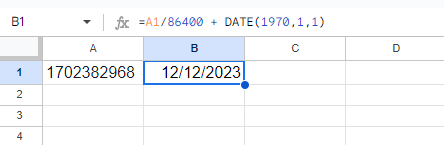
- Formatting as Date
The cell will initially show a number. To see it as a date:
- Click the cell.
- Select Format > Number > Date in the Google Sheets menu.
Further notes...
With this straightforward formula, you can effortlessly convert UNIX timestamps into readable dates in Google Sheets. Remember, these timestamps are usually in UTC, so consider time zone adjustments for accuracy in your context.